This is the multi-page printable view of this section. .
v0.1 Archive: Welcome to pg_mooncake (Delta Lake)
- 1: v0.1 Architecture (Delta Lake & USING columnstore)
- 2: v0.1 Get Started
- 3: v0.1 Hello World (USING columnstore)
- 4: v0.1 Cloud Storage (mooncake.create_secret)
- 5: v0.1 on Neon Postgres
- 6: v0.1 Reference Overview
- 7: v0.1 Columnstore DDL (USING columnstore)
- 8: v0.1 Querying Columnstore Outside Postgres
- 9: v0.1 GUC Configurations
- 10: v0.1 Load Data
- 11: v0.1 Query External Files
- 12: v0.1 Supported Queries & Query Shapes
- 13: v0.1 Data Archiving
- 14: v0.1 Operational Analytics (Trigger + pg_cron Staging)
- 15: v0.1 Data Warehousing & dbt
pg_mooncake v0.1 Archive (Delta Lake Engine)This page documents pg_mooncake v0.1, which used direct CREATE TABLE ... USING columnstore DDL and Delta Lake storage. Starting in v0.2 and PGSTY’s v0.3.0 release, pg_mooncake uses moonlink real-time columnstore mirrors (CALL mooncake.create_table + USING mooncake) and Apache Iceberg v2. For current documentation, see Introduction and v0.1 vs v0.2 & v0.3.
pg_mooncake v0.1 is the first-generation PostgreSQL extension that added USING columnstore tables backed by Delta Lake and DuckDB (pg_duckdb) for analytical workloads.
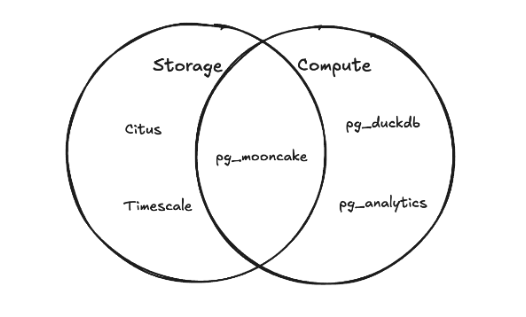
Key Features of v0.1
- Transactional
INSERT,UPDATE, andDELETEdirectly onUSING columnstoretables - Columnar Parquet + Delta Lake metadata stored on local disk or S3 / R2 object storage
- Vectorized analytical execution via embedded DuckDB
- Seamless joins between regular PostgreSQL heap tables and
USING columnstoretables
v0.1 Archive Contents
| Section | Pages |
|---|---|
| Introduction | v0.1 Architecture |
| Getting Started | Get Started · Hello World · Cloud Storage · Neon Postgres |
| Reference | Reference Overview · Columnstore DDL · Querying Outside Postgres · Configurations · Load Data · Query External Files · Supported Queries |
| Use Cases | Data Archiving · Operational Analytics · Data Warehousing |
1 - v0.1 Architecture (Delta Lake & USING columnstore)
pg_mooncake v0.1 Archive (Delta Lake Engine)This page documents pg_mooncake v0.1, which used direct CREATE TABLE ... USING columnstore DDL and Delta Lake storage. Starting in v0.2 and PGSTY’s v0.3.0 release, pg_mooncake uses moonlink real-time columnstore mirrors (CALL mooncake.create_table + USING mooncake) and Apache Iceberg v2. For current documentation, see Introduction and v0.1 vs v0.2 & v0.3.
In pg_mooncake v0.1, table metadata is stored inside PostgreSQL catalogs for transactional consistency, while columnstore data is written as Parquet files with Delta Lake metadata on local disk or object storage.
Columnstore tables are exposed as a PostgreSQL Table Access Method (USING columnstore). Queries involving columnstore tables are routed from PostgreSQL to DuckDB and streamed back via pg_duckdb.
Read Path
Queries involving USING columnstore tables are routed from PostgreSQL to DuckDB, with minor SQL query rewrites applied to bridge syntax differences.
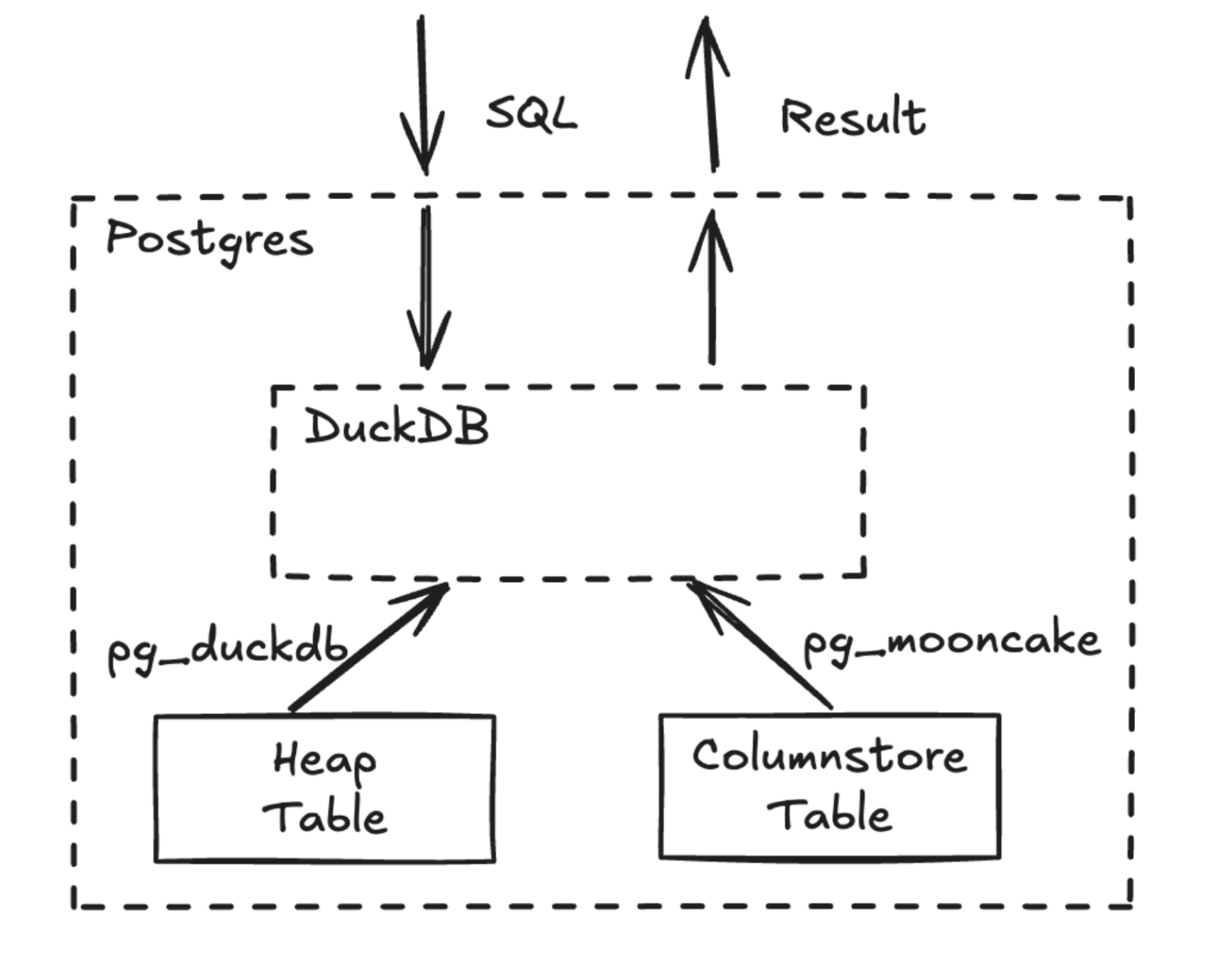
pg_mooncake v0.1 caches Parquet metadata and column statistics inside PostgreSQL (mooncake.data_files) and uses them for segment elimination during table scans.
Write Path
In v0.1, transactional INSERT, UPDATE, and DELETE statements run directly on USING columnstore tables. To support DELETE and UPDATE, an implicit row_id column consisting of (file_id, row_offset) identifies rows during table scans.
Each write transaction creates a new Parquet file. Because of this, pg_mooncake v0.1 is designed for batched writes (100,000–1,000,000 rows) rather than small, frequent OLTP transactions.
Local Disk Caching
On writes, data is cached on local disk (mooncake.enable_local_cache = true) to accelerate queries on recently written data before or alongside cloud object storage uploads.
2 - v0.1 Get Started
pg_mooncake v0.1 Archive (Delta Lake Engine)This page documents pg_mooncake v0.1, which used direct CREATE TABLE ... USING columnstore DDL and Delta Lake storage. Starting in v0.2 and PGSTY’s v0.3.0 release, pg_mooncake uses moonlink real-time columnstore mirrors (CALL mooncake.create_table + USING mooncake) and Apache Iceberg v2. For current documentation, see Introduction and v0.1 vs v0.2 & v0.3.
Historical Docker Image (Obsolete)
Building v0.1 from Source
Create the Extension
3 - v0.1 Hello World (USING columnstore)
pg_mooncake v0.1 Archive (Delta Lake Engine)This page documents pg_mooncake v0.1, which used direct CREATE TABLE ... USING columnstore DDL and Delta Lake storage. Starting in v0.2 and PGSTY’s v0.3.0 release, pg_mooncake uses moonlink real-time columnstore mirrors (CALL mooncake.create_table + USING mooncake) and Apache Iceberg v2. For current documentation, see Introduction and v0.1 vs v0.2 & v0.3.
Create the Extension
Create a USING columnstore Table (v0.1)
Inserts, Updates, and Deletes
Transactions
Joins
4 - v0.1 Cloud Storage (mooncake.create_secret)
pg_mooncake v0.1 Archive (Delta Lake Engine)This page documents pg_mooncake v0.1, which used direct CREATE TABLE ... USING columnstore DDL and Delta Lake storage. Starting in v0.2 and PGSTY’s v0.3.0 release, pg_mooncake uses moonlink real-time columnstore mirrors (CALL mooncake.create_table + USING mooncake) and Apache Iceberg v2. For current documentation, see Introduction and v0.1 vs v0.2 & v0.3.
v0.3.0 Cloud Storage SetupIn v0.2 and v0.3.0, credentials are inserted into duckdb.secrets rather than mooncake.create_secret. See Iceberg & Object Storage.
S3 Buckets (v0.1)
For S3 Express buckets:
Cloudflare R2 Buckets (v0.1)
Set Default Bucket
S3 and R2 Parameters
| Parameter | Description | Required |
|---|---|---|
name |
Name for your credentials | Yes |
key_id |
S3 / R2 access key ID | Yes |
secret |
S3 / R2 secret access key | Yes |
REGION |
AWS region where your bucket is located | Yes |
ENDPOINT |
Custom endpoint for R2 or S3 Express | Yes (R2 / S3 Express) |
SCOPE |
Bucket prefix path to scope credentials (e.g. s3://mybucket) |
No |
5 - v0.1 on Neon Postgres
pg_mooncake v0.1 Archive (Delta Lake Engine)This page documents pg_mooncake v0.1, which used direct CREATE TABLE ... USING columnstore DDL and Delta Lake storage. Starting in v0.2 and PGSTY’s v0.3.0 release, pg_mooncake uses moonlink real-time columnstore mirrors (CALL mooncake.create_table + USING mooncake) and Apache Iceberg v2. For current documentation, see Introduction and v0.1 vs v0.2 & v0.3.
pg_mooncake v0.1 was offered as an experimental extension on Neon.
Enable the Extension on Neon (v0.1)
Cloud Storage Requirement
Because Neon does not allow extensions to persist columnstore files on local compute disk, using pg_mooncake v0.1 on Neon required configuring an external S3 or Cloudflare R2 bucket as described in v0.1 Cloud Storage, and disabling Neon’s scale-to-zero feature to preserve local metadata caches.
6 - v0.1 Reference Overview
pg_mooncake v0.1 Archive (Delta Lake Engine)This page documents pg_mooncake v0.1, which used direct CREATE TABLE ... USING columnstore DDL and Delta Lake storage. Starting in v0.2 and PGSTY’s v0.3.0 release, pg_mooncake uses moonlink real-time columnstore mirrors (CALL mooncake.create_table + USING mooncake) and Apache Iceberg v2. For current documentation, see Introduction and v0.1 vs v0.2 & v0.3.
- v0.1 Columnstore DDL (
USING columnstore) - v0.1 Querying Columnstore Outside Postgres (
mooncake.columnstore_tables) - v0.1 GUC Configurations (
mooncake.maximum_memory,mooncake.maximum_threads) - v0.1 Load Data (
COPY&mooncake.read_parquet) - v0.1 Query External Files (
mooncake.read_parquet,mooncake.read_csv,iceberg_scan,delta_scan) - v0.1 Supported Queries & Query Shapes
7 - v0.1 Columnstore DDL (USING columnstore)
pg_mooncake v0.1 Archive (Delta Lake Engine)This page documents pg_mooncake v0.1, which used direct CREATE TABLE ... USING columnstore DDL and Delta Lake storage. Starting in v0.2 and PGSTY’s v0.3.0 release, pg_mooncake uses moonlink real-time columnstore mirrors (CALL mooncake.create_table + USING mooncake) and Apache Iceberg v2. For current documentation, see Introduction and v0.1 vs v0.2 & v0.3.
Create Columnstore Table (v0.1)
In v0.1, columnstore tables were created directly with the USING columnstore clause:
Drop Columnstore Table
Supported Features & Limitations in v0.1
- Supported:
INSERT,UPDATE,DELETE, ACID transactions,NOT NULLconstraints, default values, and joins with heap tables. - Unsupported Data Types in
v0.1:ENUM,uhugeint,JSONB(partial), and complex arrays. - Unsupported Constraints in
v0.1: Primary keys, foreign keys, unique constraints, indexes, and partitioned tables (ALTER TABLEschema changes required recreating the table).
Setting columnstore as Default Table Access Method (v0.1)
8 - v0.1 Querying Columnstore Outside Postgres
pg_mooncake v0.1 Archive (Delta Lake Engine)This page documents pg_mooncake v0.1, which used direct CREATE TABLE ... USING columnstore DDL and Delta Lake storage. Starting in v0.2 and PGSTY’s v0.3.0 release, pg_mooncake uses moonlink real-time columnstore mirrors (CALL mooncake.create_table + USING mooncake) and Apache Iceberg v2. For current documentation, see Introduction and v0.1 vs v0.2 & v0.3.
v0.3.0 Metadata FunctionIn v0.2 and v0.3.0, use SELECT * FROM mooncake.list_tables(); to inspect table LSNs and Apache Iceberg v2 warehouse locations.
Finding Table Locations (v0.1)
In v0.1, mooncake.columnstore_tables listed the Delta Lake directory path for each USING columnstore table:
Example output:
Viewing Data Files (v0.1)
Accessing v0.1 Delta Lake Tables with Polars
9 - v0.1 GUC Configurations
pg_mooncake v0.1 Archive (Delta Lake Engine)This page documents pg_mooncake v0.1, which used direct CREATE TABLE ... USING columnstore DDL and Delta Lake storage. Starting in v0.2 and PGSTY’s v0.3.0 release, pg_mooncake uses moonlink real-time columnstore mirrors (CALL mooncake.create_table + USING mooncake) and Apache Iceberg v2. For current documentation, see Introduction and v0.1 vs v0.2 & v0.3.
v0.1 GUC Parameters
10 - v0.1 Load Data
pg_mooncake v0.1 Archive (Delta Lake Engine)This page documents pg_mooncake v0.1, which used direct CREATE TABLE ... USING columnstore DDL and Delta Lake storage. Starting in v0.2 and PGSTY’s v0.3.0 release, pg_mooncake uses moonlink real-time columnstore mirrors (CALL mooncake.create_table + USING mooncake) and Apache Iceberg v2. For current documentation, see Introduction and v0.1 vs v0.2 & v0.3.
From PostgreSQL Heap Tables (v0.1)
From Parquet, CSV, or JSON Files (v0.1)
From Iceberg, Delta Lake, or HuggingFace (v0.1)
11 - v0.1 Query External Files
pg_mooncake v0.1 Archive (Delta Lake Engine)This page documents pg_mooncake v0.1, which used direct CREATE TABLE ... USING columnstore DDL and Delta Lake storage. Starting in v0.2 and PGSTY’s v0.3.0 release, pg_mooncake uses moonlink real-time columnstore mirrors (CALL mooncake.create_table + USING mooncake) and Apache Iceberg v2. For current documentation, see Introduction and v0.1 vs v0.2 & v0.3.
v0.3.0 External File ReadersIn v0.2 and v0.3.0, use duckdb.read_parquet, duckdb.read_csv, duckdb.iceberg_scan, and duckdb.delta_scan as documented in Query Your Data Lake in Postgres.
Querying Parquet, CSV, and JSON (v0.1)
Querying Iceberg and Delta Lake (v0.1)
12 - v0.1 Supported Queries & Query Shapes
pg_mooncake v0.1 Archive (Delta Lake Engine)This page documents pg_mooncake v0.1, which used direct CREATE TABLE ... USING columnstore DDL and Delta Lake storage. Starting in v0.2 and PGSTY’s v0.3.0 release, pg_mooncake uses moonlink real-time columnstore mirrors (CALL mooncake.create_table + USING mooncake) and Apache Iceberg v2. For current documentation, see Introduction and v0.1 vs v0.2 & v0.3.
For the updated v0.3.0 guide on query shapes and DuckDB 2.0 execution, see Query Columnstore & Query Shapes.
Analytical Aggregations & Time-Series (v0.1)
Exposing DuckDB Functions in Postgres (v0.1)
13 - v0.1 Data Archiving
pg_mooncake v0.1 Archive (Delta Lake Engine)This page documents pg_mooncake v0.1, which used direct CREATE TABLE ... USING columnstore DDL and Delta Lake storage. Starting in v0.2 and PGSTY’s v0.3.0 release, pg_mooncake uses moonlink real-time columnstore mirrors (CALL mooncake.create_table + USING mooncake) and Apache Iceberg v2. For current documentation, see Introduction and v0.1 vs v0.2 & v0.3.
v0.3.0 Partition Archiving PatternIn v0.2 and v0.3.0, you no longer need manual INSERT INTO ... DELETE FROM batch scripts—simply mirror a partitioned table with CALL mooncake.create_table and DROP old partitions. See Archiving Large Postgres Tables.
How Archiving Worked in v0.1
14 - v0.1 Operational Analytics (Trigger + pg_cron Staging)
pg_mooncake v0.1 Archive (Delta Lake Engine)This page documents pg_mooncake v0.1, which used direct CREATE TABLE ... USING columnstore DDL and Delta Lake storage. Starting in v0.2 and PGSTY’s v0.3.0 release, pg_mooncake uses moonlink real-time columnstore mirrors (CALL mooncake.create_table + USING mooncake) and Apache Iceberg v2. For current documentation, see Introduction and v0.1 vs v0.2 & v0.3.
mooncake.create_table in v0.2 / v0.3.0In v0.1, syncing a rowstore table to a USING columnstore table required triggers, a staging table, and a pg_cron job. In v0.2 and v0.3.0, all of this is replaced by a single CALL mooncake.create_table('orders_analytics', 'orders');. See Real-Time Operational Analytics.
Historical v0.1 Staging & Trigger Pattern
15 - v0.1 Data Warehousing & dbt
pg_mooncake v0.1 Archive (Delta Lake Engine)This page documents pg_mooncake v0.1, which used direct CREATE TABLE ... USING columnstore DDL and Delta Lake storage. Starting in v0.2 and PGSTY’s v0.3.0 release, pg_mooncake uses moonlink real-time columnstore mirrors (CALL mooncake.create_table + USING mooncake) and Apache Iceberg v2. For current documentation, see Introduction and v0.1 vs v0.2 & v0.3.
Daily Aggregation Pipeline (v0.1)
Integration with dbt (v0.1)
In v0.1, dbt models could target USING columnstore by setting default_table_access_method in an on-run-start hook: